


Music Video
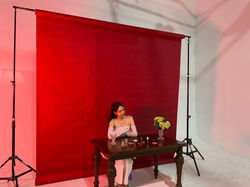
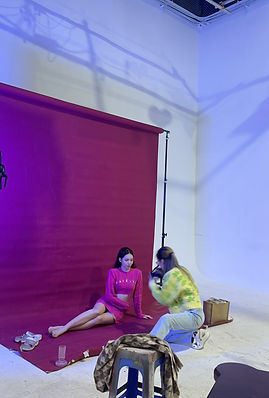
Pre-shoot Behind The Scene
Scene 1 -
Cosmetics


Date: 27/1/2024
Time: 10am to 7pm
Location: S Studio - 4 Alley 250, Khuong Trung, Thanh Xuan, HN
Choice of lighting: Aputure Nova P6000C Lighting
Shooting equipment: Sony A730, background canvas paper
Props & costumes: flower vase, cosmetic products (lipstick, concealer, setting powder…), hourglass, table and a white dress
Performer: Ngoc Chau
Scene 2 - Pink sets lying
Date: 27/1/2024
Time: 10am to 7pm
Location: S studio - 4 Alley 250, Khuong Trung, Thanh Xuan, HN
Choice of lighting: Aputure Nova P6000C Lighting
Shooting equipment: Sony A7S3
Props & costumes: pink wool skirt and top and pearls
Performer: Ngoc Chau
Scene 3 - Angel with feather
Date: 27/1/2024
Time: 10am to 7pm
Location: S studio - 4 Alley 250, Khuong Trung, Thanh Xuan, HN
Choice of lighting: Aputure Nova P6000C Lighting
Shooting equipment: Sony A7S3
Props & costumes: denim dress, pearls, fur carpet, picnic chair, feathers
Performer: Ngoc Chau
Scene 4 - Red mirror
Date: 27/1/2024
Time: 10am to 7pm
Location: S studio - 4 Alley 250, Khuong Trung, Thanh Xuan, HN
Choice of lighting: Aputure Nova P6000C Lighting
Shooting equipment: Sony A7S3
Props & costumes: mirror, red dress, lipstick, tissue
Performer: Ngoc Chau
Scene 5 - Choreography
Date: 27/1/2024
Time: 10am to 7pm
Location: S studio - 4 Alley 250, Khuong Trung, Thanh Xuan, HN
Choice of lighting: Aputure Nova P6000C Lighting
Shooting equipment: Sony A7S3
Props & costumes: gloves, pink and black dress, lipstick, boots
Performer: Ngoc Chau
Scene 6 -
Retro lipsyncing

Date: 28/1/2024
Time: 10am to 7pm
Location: S studio - 4 Alley 250, Khuong Trung, Thanh Xuan, HN
Choice of lighting: Aputure Nova P6000C Lighting
Shooting equipment: Sony A7S3
Props & costumes: microphone, purple set of costumes, black curtain
Performer: Ngoc Chau
Scene 7 -
Tied by rope
Date: 28/1/2024
Time: 10am to 7pm
Location: S studio - 4 Alley 250, Khuong Trung, Thanh Xuan, HN
Choice of lighting: Aputure Nova P6000C Lighting
Shooting equipment: Sony A7S3, black canvas background
Props & costumes: lace, black hoodie, black pants, rope
Performer: Ngoc Chau
Scene 8 - Flowers burning
Date: 3/2/2024
Time: 6pm to 7:30 pm
Location: Hang Da Alley
Shooting equipment: Sony A7S3
Props & costumes: bouquet of fake roses, lighter, grey shirt, black trousers
Performer: Ngoc Chau
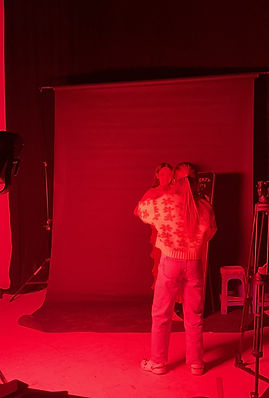
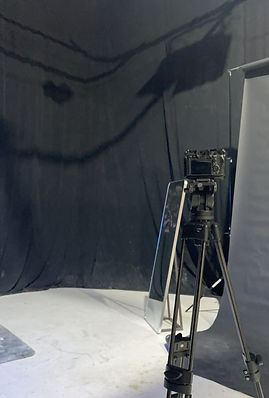
BTS Photos
 |  |  |  |
|---|---|---|---|
 |  |  |

TIMELAPSE







Raw Footages
Dance Scene
Cosmetics Scene
Angel Scene
Retro Lipsyncing Scene
Mirror Scene
Rope Scene
Pink Lying Scene
Rushes Log
Rushes Log


Editing Process
During the editing process, I used Adobe Premiere Pro to edit the whole music video, including add effects, colour grading, sound mix as well as layering and trimming. I chose this app because it specialised in editing video such as music video or film. While using Premiere Pro, I found it quite complicated as there are a wide range of tools that you can use for your product. However, it is also very useful as it includes everything we need to produce an outstanding product.
Import & Trimming
Effect
Effect
Export


The editing process of this music video took lots of my time since I had to do it in a careful way. The majority of time that I spend on editing is 2 to 3 hours at one time. This is a very time-consuming task because previously, you will not know exactly the effect or footage to use in the music video. This is why you have to spend time and experiment on the range of effects on your music video. Whenever I have an idea, I will search on Youtube for that effect tutorial which is very useful and convenient as I am not a professional editor. Even though it is very exhausting, I appreciated the time that was spent on editing as it enhances my editing skills a lot.
Rough Cuts
Rough Cuts
Music Video Draft 1
This is our first draft of the music video where I just finished layering and trimming the raw footage. There are lots to improve since it is the first draft but it is helpful to get some feedbacks and suggestions from our target audience
Music Video Draft 2
This is our second draft of the music video where I just added colour grading. The music video now looks more appealing with colour being adjusted based on the natural lighting. Colour grading helps to make the music video more standout as well as raise the feeling of audience more easily
Music Video Draft 3
The third draft of our music video is the draft after I added special effects into the music video. Adding effects help to make the music video more professional and appealing to the audience as it looks more majestic. This draft is close to the final draft because we just need to collect feedback from audiences to make adjustments.
Music Video Draft 4
The fourth draft of our music video is the addition of the third draft after making adjustments from audience’s feedback. In this draft, I added more special effects to create a more cohesive sequence of footage
Audience Test-Screening Feedback
Music Video Draft that show audience for test-screening feedback
Year 12 Test-Screening Feedback


We decided to collect feedback from the Y12 Media Studies class from our school because luckily they are in our target audience. Having them as our first group of audience can help us to have more critical feedback to improve the current music video. They can use the media terminology so we can immediately understand what they mean and their intention
Some Audience Test-Screening Feedback
These are some feedbacks I have collected from four girls that are in the age range of our target audience from 16 to 24 years old. All of them find our products appealing and eye-catching to them as audience. After getting these feedback, we can narrow down and point out our weaknesses and what needs to be improved to make the products even better. Even though there are still areas that we need to work on, we are pleased that our products match the style and perspective of the target audience - Vietnamese young females.